Build your family tree from scratch
Have you ever wanted to sit down and compile your family tree but were daunted by the task? Agelong Tree is a program intended for helping you do just that by storing and displaying information about your relatives and the key events in their lives. With millions of users sharing family information on the internet, tracing your family history has never been easier. Although sites such as Genes Reunited now boast over 90 million users, not everyone wants to share their family information online. Which is where Agelong Tree comes in.
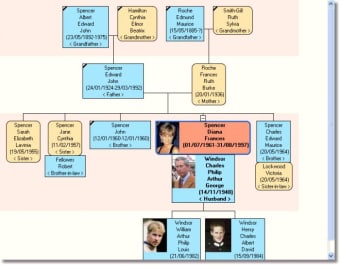
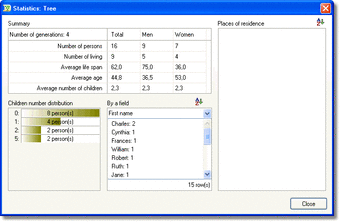
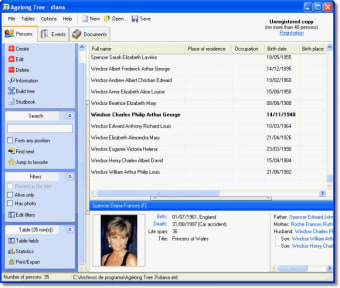
The program works with a spreadsheet style interface and automatically builds the tree as you enter family members. Each box has a “mechanism of events” option which allows you to compile complex biographies, store texts, photos, sounds and even videos of your relatives. You can also export this information statistically and view it in attractive graphical presentations.
An algorithm automatically builds the interconnectedness of the family tree as you enter information about people and hit the save option to compile it. One of the key elements of the program is the event display module which highlights the major moments in a person’s life and displays them in graphical form. There are a number of standard event types such as birth, marriage, house move but you can also create your own event types which can have one or more participants. For example, there are three standard participants in the event of a birth – the newborn, the father and the mother. Along with standard participants you can add to an event an unlimited number of participants with other roles such as a witness, a midwife or even a lover (such as if the baby was conceived outside of the marriage by the milkman or something).
You can also filter your family by criteria. For example, you can select all those who lived in your home town, who were born in the 30s or all those who held certain jobs. This is one of the handiest features of this programme and it’s lacking from websites such as Genes Reunited. It’s quite interesting to be able to filter your family members’ attributes to see which ones you had the most in common with or which showed the most similar characteristics.
The drawback is that obviously, since it’s not online and you are not interconnected with other users, you can only extend your family tree as far as your knowledge goes. You also have to enter each member manually which is terribly time consuming when you are talking about biographies, events in their lives and other details. These factors are already done for you by other users on website based family trees.
Nevertheless, the attractive graphics and ease of use make this an excellent choice for anyone who would rather keep their family history to themselves.
Changes
The program is started and data tables are loaded faster now Some interface elements are now displayed correctly under Windows Vista It is possible to mark stress now when you entering text (the Ctrl+I key combination). The correctness of the stress mark depends on the selected interface font. Fixed: Collapsed branches are now correctly restored while you refresh the built tree Fixed: If a person had no main photo, it appeared after you added any photo document to the person Now when you save a file under another name, the old folder with documents is deleted before the new one is created During export into xml, the full birth and death places of a person are saved When you create a daughter, only the maiden name is specified now while the main name remains empty Now it is possible to sort by the source name on the "Sources" tab in the window where you edit a person, event, document